
We have the beginnings for our Virtual Queues. We have the concept of a Token and a Dispenser of tokens. We have made these thread safe so we are guaranteed that everyone requesting a token gets a unique one. At this point we can create a simple web interface on top of the token dispenser just so we can see how the whole system will evolve incrementally, After the web interface we will put a mobile interface on top of our Token Dispenser and then we will add persistence to it.
For now we will keep these interfaces very simple. We will display the number of the next token that the dispenser will hand out. We will also provide a button that the user of the interface can press to dispense a token for them at which point we will display the token number that the user got from the token dispenser. We will also update the next available token number from the dispenser. The challenging part about this interface is that multiple clients might be using the same token dispenser. They will have to be updated simultaneously as soon as any one requests the next token. For example, lets say that there are two separate users interested in getting token from the same dispenser. If the number of the next token that the dispenser can hand out is 100, as soon as any one of the user requests the token, both the users should be updated to show that the next token that can be dispensed is 101.
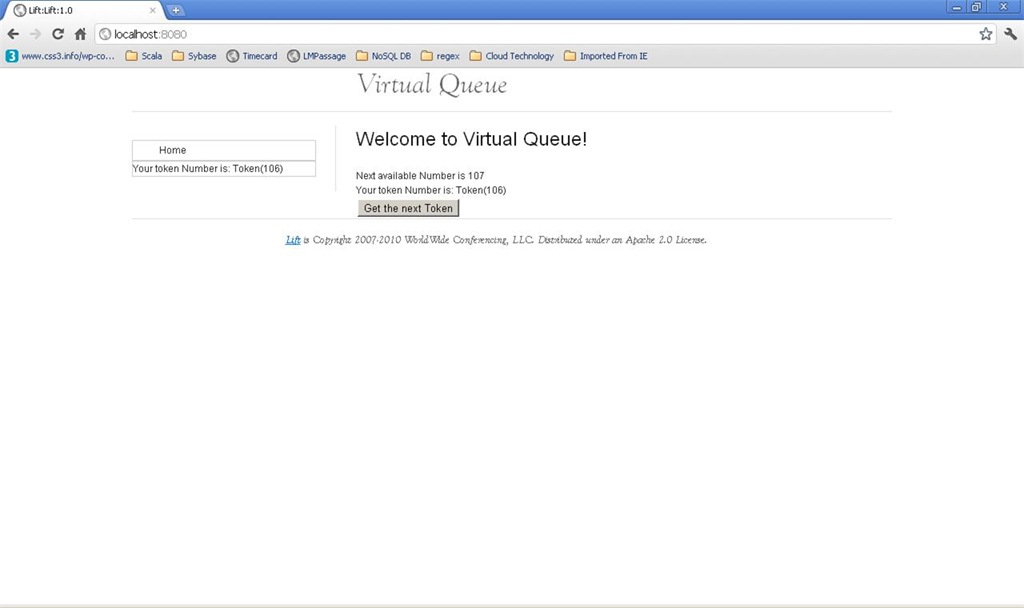
In this blog we will see how to create this simple web interface and then how to achieve the simultaneous update of all the browsers with the next token number as soon as one of them requests a token.
In the spirit of learning Scala we will create our web interface using Lift, a web framework developed in Scala. Lift fits naturally with the Scala Middle tier that we have been coding up until now.
A Little Lift
Unlike other traditional web frameworks e.g. JSF, Struts, Grails etc. Lift framework is NOT based on the MVC design pattern. Where as in a traditional MVC framework, the user actions from the web browsers are handed first to a controller which converts those into actions on the model class and then select the right views to form the responses, Lift loads the views first and builds the output page from the view. In case of Lift, the view is a fully qualified HTML file. It is sprinkled with a lot of components. These components are backed by Scala classes called Snippets. The logic in the Snippet class provides the dynamic content for the web page.
Lift prescribes the following steps to get dynamic content of a page rendered correctly –
- Define a Sitemap entry for the page.
- Create the View. A view is nothing but a HTML page sprinkled with directives where dynamic contents should be inserted.
- Create the logic in a Snippet, a Scala class or object that will transform the view HTML into a dynamically generated HTML which is what is sent back as HTTP response.
Like rails, Lift works on convention as opposed to customization. It expects certain things in pre defined locations. For example, the View HTML files are expected in the webapp folder under the src tree, Convention over customization makes it easier to develop applications. The best way to get started with Lift is to use one of the pre-defined templates to create the directory for your project. Alternately, if you are using Maven, another way to get started is to use a Maven archetype (e.g. lift-archetype-basic).
Once the directory structure is created, we will start by defining the sitemap for our web application. For this simple interface we will have only one page. This page will become the “Home” page for the application. We will make an entry for the home page in the sitemap. Every Lift application calls a Boot class when it starts the Boot class is defined in the bootstrap.liftweb package and its called Boot.scala. Here is the code for Boot.scala –
[sourcecode language=”scala”]
package bootstrap.liftweb
import _root_.net.liftweb.common._
import _root_.net.liftweb.http._
import _root_.net.liftweb.http.provider._
import _root_.net.liftweb.sitemap._
import _root_.Lift.model._
/**
* A class that’s instantiated early and run. It allows the application
* to modify lift’s environment
*/
class Boot {
def boot {
// where to search snippet
LiftRules.addToPackages("Lift")
// Build SiteMap
def sitemap() = SiteMap(
Menu("Home") / "index"
)
LiftRules.setSiteMapFunc(() => sitemap())
/*
* Show the spinny image when an Ajax call starts
*/
LiftRules.ajaxStart =
Full(() => LiftRules.jsArtifacts.show("ajax-loader").cmd)
/*
* Make the spinny image go away when it ends
*/
LiftRules.ajaxEnd =
Full(() => LiftRules.jsArtifacts.hide("ajax-loader").cmd)
LiftRules.early.append(makeUtf8)
}
/**
* Force the request to be UTF-8
*/
private def makeUtf8(req: HTTPRequest) {
req.setCharacterEncoding("UTF-8")
}
}
[/sourcecode]
Boot class provides an entry point into our web application. This is where all the configuration that is needed for the web application is done. Lift provides a LiftRules Singleton for holding the rules for the web application. In this example, we define a sitemap function and register the function with the LiftRules Singleton. The Sitemap function will be invoked as needed. This function will return a Sitemap object that could be made up of several Menu items. A menu item has a Loc (pronounced as “loke”) object, that specifies the location of the menu (the link that will be hit on the server side) and a list of sub menus. In the case above, the only menu item is the “Home” Page, which links to index.html file specified by the Loc. We also define a ”spinning” image that will show up when an Ajax command starts. The image disappears upon the completion of the Ajax command.
That is pretty much it for the sitemap and the boot process.
Next we will look at the View class which is nothing but a HTML template that feeds into a Snippet class to get converted into the final HTML page for rendering on the browser. Here is the code for the index.html.
[sourcecode language="html"]
<div class="lift:surround?with=default;at=content">
    <h2>Welcome to Virtual Queue!</h2>
    <div class="lift:comet?type=TokenObserver">
        Next available Number is <span id="token">The next token</span>
    </div>
    <form class="lift:form.ajax">
        <div class="lift:TokenDispenser">
            <span class="lift:Msg?id=myToken">Token Number</span><br/>
            <span id="hidden"></span>
            <input type="submit" value="Get the next Token"/>
        </div>
    </form>
</div>
[/sourcecode]
This looks like a regular HTML page and it is one; except if you notice the page has several <div> tags with class attributes whose value starts with the string “lift:”. This is where Lift will inject the Scala code in order to get the dynamic content for the web page.
The first such Snippet that is listed on the page is “lift:surround?with=default;at=content”. What this is telling Lift is to surround this element with a template called default.html; that is, by convention, located in the templates-hidden folder. The directive for the snippet is to wrap this element with the default.html by inserting the contents of this element at the element with id “content” in default,html. This allows us to wrap a common template around our pages. However, Lift is flexible and also allows us to select different templates for surrounding our code. A template can further be decorated by other templates.
The next class that calls a Snippet is “lift:comet?type=TokenObserver”, we will come to this in a minute. But first lets consider the form that is part of this view. The form is an Ajax form, the class “lift:form.ajax” is a built in snippet that comes with Lift and it converts a form into an Ajax form so that the entire page is not loaded when the submit button is pressed. In Lift a form is backed up by a function value that is associated with a unique ID that is assigned to the form. What does this mean? Well in Scala, functions are first class citizens and like an imperative language such as Java where, for example, class members are first class citizens, in Scala functions have the same power. Which means that we can take a function and pass it along just like we pass arguments to a method.
In case of forms, what ends up happening is that each rendered form is given a unique ID (called GUID). Associated with this ID is a function which gets invoked by the Lift Framework when the form is submitted back. Lift maintains the association between the form’s GUID and the function value. So when the form is submitted back to the server, it knows which function to invoke to fulfill the request. What this also implies is that once a page is rendered by an instance of a server, the session needs to stick to that server instance only. In a traditional MVC web framework this could lead to scaling issues, however, since Lift uses the light weight Actor model, it is claimed that scaling is not an issue. You can read more about this on the net. So, if there are 100 forms opened on 100 different web browsers, each will have a different ID associated with it and each will invoke its instance of the function on the server when it is submitted back.
So the form.ajax snippet does the following, it takes the index.html and puts a unique ID on that form. The rendered HTML ends up looking something like this:
[sourcecode language=”html”]</pre>
<form id="F6959200839461HR513" action="javascript://" onsubmit="liftAjax.lift_ajaxHandler(jQuery(‘#’+"F6959200839461HR513").serialize(), null, null, "javascript");return false;">
<div>
<span id="myToken"></span><br />
<input id="hidden" value="true" name="F695920083947LKXWTQ" type="hidden" />
<input value="Get the next Token" type="submit" />
</div>
</form>
<pre>[/sourcecode]
The id=”F6959200839461HR513″ is what Lift adds to the form. When the form is submitted to the server, a new ID is assigned to the form. This is cool because once a form is served, its no longer valid and a form with new ID is rendered back. This is the key mechanism how Lift can prevent against CSRF attacks.
As part of building out the page, our snippet that was added as <div class=”lift:TokenDispenser”> will be invoked. The code for this snippet is as follows.
[sourcecode language=”scala”]
package Lift.snippet
import Lift.model.AQueue
import net.liftweb._
import http._
import util.Helpers._
import js._
import JsCmds._
import Lift.comet.TokenRefresher
object TokenDispenser {
def render = {
// our process method returns a
// JsCmd which will be sent back to the browser
// as part of the response
def process() : JsCmd= {
S.notice("myToken", "Your token Number is: "+AQueue.tokenDispenser.dispense.toString)
TokenRefresher ! "R"
Noop
}
// binding looks normal
"#hidden" #> SHtml.hidden(process)
}
}
[/sourcecode]
This code is simple and all it does is it calls the CSS selector transform on a field whose id is “hidden”. We had to add a hidden field to our form because the submit button is not serialized over Ajax, and we need a mechanism to invoke the underlying function when the form is submitted. The function that we attach to the hidden element (which will get a unique ID as well, each time it is rendered), is called “process”. We attach this process via SHtml.hidden method. The SHtml.hidden method does two things, one it transforms the <span> element with id “hidden” in the source HTML template into a input field of type “hidden”. It also assigns a unique ID to this hidden input field and associates the process method with this ID. When the form is submitted back, the process method associated with this ID is invoked and it does the following, it gets the ONLY token dispenser we have in the system so far to dispense the next token. It then sets the NOTICE notice on the current response noting the next token number that was dispensed. This method then sends a message to the TokenRefresher object which we will see in a minute notifying it that a new token was dispensed. It returns a Noop Java Script command to the browser which basically does nothing.
How to simultaneously update all the browsers with the next available token number
OK now lets see how we will be able to update all the browsers that are watching the same token dispenser. This is a classic problem that can be solved in one of these ways,
- We put an ajax periodical updater that periodically polls the server for the latest token number that can be dispensed from our dispenser. The problem with this approach is that there might be a little lag between when a token gets dispensed and when all the web pages get updated. It might lead to confusion for the user requesting a token as they might get a different token number from what they were expecting.
- Or we can use a long polling mechanism such as comet where a long-held HTTP request lets the web server push out data to the browsers without the browser explicitly requesting it.
- Use HTML 5 push notification technology.
For now we will see how to achieve this using the comet support along with the Actors threading model that comes built in with the Lift framework. If time permits we will delve into the HTML 5 solution later. We have already seen the power of the Actors model in our previous blog. Lets now see the Comet support in Lift using this model.
Let us go back to the view definition one more time and consider the <div> with the following class – <div class=”lift:comet?type=TokenObserver”>. The built in “comet” snippet will be invoked when Lift encounters this class. The Comet Snippet will look for an Actor called TokenObserver. This needs to be a special kind of actor – a CometActor. Whenever the state of the CometActor changes it will push those changes out to the browsers. Here is the code for TokenObserver.
[sourcecode language=”scala”]
package Lift.comet
import Lift.model.AQueue
import net.liftweb.http.{CometListener, CometActor}
/**
*
* User: Anupam Chandra
*/
class TokenObserver extends CometActor with CometListener {
private var nextTokenNumberToBeDisplayed = AQueue.tokenDispenser.peek
// Register with TokenRefresher
def registerWith = TokenRefresher
override def lowPriority = {
case i: Int => nextTokenNumberToBeDisplayed = i;reRender()
}
def render = {
"#token *" #> nextTokenNumberToBeDisplayed
}
}
[/sourcecode]
Since TokenObserver is a CometActor, it needs to provide mechanism for handling messages. The lowPriority method provided by this class does exactly that – it does a pattern match on the integer that comes in as a message, takes that integer as the next available token number, updates its state and calls the reRender method. The reRender method uses CSS transformation to modify the Element with id “token”.
So who sends out messages to the TokenObserver? The TokenObserver is also a CometListener and it registers itself with a TokenRefresher object. TokenRefresher is a Singleton object for now that will notify all its listeners whenever someone requests a token. The code for TokenRefresher is as follows:
[sourcecode language=”scala”]
package Lift.comet
import net.liftweb.actor.LiftActor
import net.liftweb.http.ListenerManager
import Lift.model.AQueue
/**
*
* User: Anupam Chandra
*/
object TokenRefresher extends LiftActor with ListenerManager {
/* When we update the listeners we send the next available token
*/
def createUpdate = AQueue.tokenDispenser.peek
override def lowPriority = {
case "R" => updateListeners()
}
}
[/sourcecode]
The code is very simple. Our TokenRefresher is an Actor, a LiftActor that we can send messages to. For now its a Singleton Object since we have only one TokenDispenser in our system. It’s also a ListenerManager so all the TokenObservers can register themselves with it. When ever someone requests for a new Token, the method registered as part of the TokenDispenser render method, the “process” method is invoked. This method does two things as we have seen before, it will dispense a token and it ALSO sends a message to the TokenRefresher. For now it just sends a simple string “R” as a message. This is sufficient to inform the TokenRefresher that someone just got a new token and that the TokenRefresher should update all its registered listener TokenObservers; which it does by calling updateListeners method. The updateListener method in turn uses the createUpdate method to create the actual update it will send to its observers. Remember that the TokenObservers are themselves actors and so they can accept messages, which is what the TokenRefresher does. It sends all its observers the createUpdate message. We have already seen how the lowPriority method of TokenObserver class will handle this message. This way whenever anyone requests a token all the other interested parties will get automatically updated with the next token number that will be dispensed next.
Conclusion
That about does it for today’s blog. We created a fully functional, multi-threaded, full duplex communication based web interface that takes care of all the top OWASP security threats such as XSS, CSRF etc. in about 60 lines of code. Next we will develop a mobile interface for our TokenDispenser.