
Happy New Year everyone! Hope you all had wonderful Holidays!
We are going to begin this new year by finally putting the iOS interface together. To recap, we have the building blocks for our Virtual Queues in place. We have a web service that can be used to request tokens, we also have an open Socket that we can listen on to get real time updates about the next available token number. We are going to use both of these capabilities in putting together an iOS app that will look similar to the web application. We will be able to request tokens using this app and we can get real time updates about the next available token.
Creating the UI
Let’s begin by creating a simple UI that mimics the same capabilities as the Web interface. We are not going to explain how to create a GUI for iOS. There are plenty of good tutorials out there for this. We will only go over the relevant code for our application. Our UI will have two updateable labels and one button. One of the labels will show the next available token number, the other one will show the number of the token that we requested by pressing the button. Of course just as in the web interface we can request as many tokens as we wish. Each time anyone requests a token, all the clients connected to the server will be updated simultaneously with the number of the next available token.
The GUI will look like this.
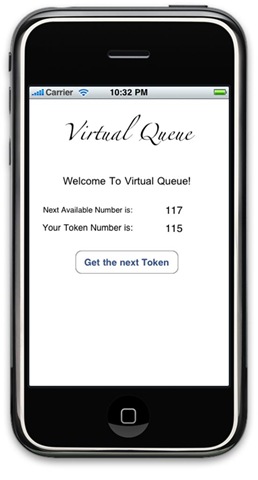
Backing this GUI is a controller class. This controller class is used to manipulate the labels as well as handling a touch action from the button.
[sourcecode language=”objc”]
#import <Foundation/Foundation.h>
#import "QueueServerSocketConnection.h"
@interface Controller : NSObject {
IBOutlet UILabel *nextAvailableToken; // Label to show the next available token number
IBOutlet UILabel *myTokenNumber; // Label to show the our latest token number
QueueServerSocketConnection* connection; // Socket Connection
NSMutableData* myTokenBuffer; // Buffer to hold tokens returned by the server
}
– (IBAction)getNextToken:sender;
@end
[/sourcecode]
The interface file for our Controller has an entry for each of the labels, one for the next available token and the other for the token that was requested by the user. It also has a pointer to a QueueServerSocketConnection class. This class abstracts the socket connection to the Queue Server. Finally, there is a pointer to a buffer that will be used to hold the token returned by the server when the UI button is pressed. To handle the event of a user pressing the UI button, our Controller class declares an action getNextToken. This action will generate the Rest Web Service request to the server to get the next token.
Socket Connection to the Server for Live Updates
In order to get live updates from the Queue Server about the next available token, we will create a class to abstract the gory details from the GUI Controller. Our GUI Controller will simply register with this class to get the number of the next token when and if it becomes available.
The QueueServerSocketConnection class will hide the details of opening a Socket Connection to the server, managing the data streams, patiently listening on the input data stream and then collecting the bytes as they arrive and composing a number out of the raw data taking into consideration all the details such as the endianess. Here is the interface for this class.
[sourcecode language=”objc”]
#import <Foundation/Foundation.h>
#import <CFNetwork/CFSocketStream.h>
#import "TokenListener.h"
@interface QueueServerSocketConnection : NSObject {
id<TokenListener> listener;
// Host and Port to connect to…
NSString* host;
int port;
// Stream to read
CFReadStreamRef inputDataStream;
bool inputDataStreamOpen;
NSMutableData* inputDataBuffer;
}
@property(nonatomic,assign) id listener;
// Initialize
– (id)init:(NSString*)host andPort:(int)port;
// Connect to the server
– (BOOL)connect;
// Close connection
– (void)disconnect;
@end
[/sourcecode]
This class contains all the data elements needed to establish a successful socket connection. It has the information about the host and the port that it needs to connect to, for reading data it has a CFReadStreamRef object, it also has a data buffer that will be used to collect the token number of the next available token as it arrives on our input stream. This class also has a listener that is registered with it. This listener is the one interested in getting the token number of the next available token. So when a number arrives on the input stream this class will read it off and invoke the appropriate method of the TokenListener. Since any class can be interested in a token, instead of making TokenListener a concrete class, we will make it a protocol and then let any class interested in a token conform to the protocol.
A protocol in objective-c is similar to a java interface, it declares set of methods and any concrete class can conform to the protocol by declaring it in its interface and then by implementing all the protocols methods. Our TokenListener protocol looks like this –
[sourcecode language=”objc”]
@class QueueServerSocketConnection;
@protocol TokenListener
– (void) connectionAttemptFailed:(QueueServerSocketConnection*)connection;
– (void) connectionTerminated:(QueueServerSocketConnection*)connection;
– (void) receiveNewToken:(int)token;
@end
[/sourcecode]
This is a simple protocol that will handle receiving a new token and any socket connection failures. For now, we will make our Controller class conform to this protocol and register the Controller object with the QueueServerSocketConnection as its TokenListener.
Ok so its time to see how our QueueServerSocketConnection will be implemented. (please note that some of this code is influenced by the excellent tutorial found at – http://mobileorchard.com/tutorial-networking-and-bonjour-on-iphone/, for a better understanding of network programming I would highly recommend reading this).
We will start with opening a connection to the host on a particular port and attaching an input stream to it.
[sourcecode language=”objc”]
– (BOOL)connect {
if ( self.host != nil ) {
// Bind read/write streams to a new socket
CFStreamCreatePairWithSocketToHost(kCFAllocatorDefault, (CFStringRef)self.host,
self.port, &inputDataStream, NULL);
return [self setupInputDataStream];
}
// No host – cannot connect
return NO;
}
[/sourcecode]
The CFStreamCreatePairWithSocketToHost creates a readable stream (but no writeable stream, since we pass NULL for write stream). Next we will set up the input stream –
[sourcecode language=”objc”]
– (BOOL)setupInputDataStream {
// Make sure streams were created correctly
if ( inputDataStream == nil ) {
[self disconnect];
return NO;
}
// Create buffer for reading data
inputDataBuffer = [[NSMutableData alloc] init];
// Sockets should close when streams close
CFReadStreamSetProperty(inputDataStream, kCFStreamPropertyShouldCloseNativeSocket,
kCFBooleanTrue);
// Handle following stream events
CFOptionFlags registeredEvents =
kCFStreamEventOpenCompleted |
kCFStreamEventHasBytesAvailable |
kCFStreamEventCanAcceptBytes |
kCFStreamEventEndEncountered |
kCFStreamEventErrorOccurred;
// Setup stream context – reference to ‘self’ will be passed to stream event handling callbacks
CFStreamClientContext ctx = {0, self, NULL, NULL, NULL};
// Specify callbacks that will be handling stream events
CFReadStreamSetClient(inputDataStream, registeredEvents, inputDataStreamEventHandler, &ctx);
// Schedule streams with current run loop
CFReadStreamScheduleWithRunLoop(inputDataStream, CFRunLoopGetCurrent(),
kCFRunLoopCommonModes);
// Open input stream
if ( ! CFReadStreamOpen(inputDataStream)) {
[self disconnect];
return NO;
}
return YES;
}
[/sourcecode]
During the set up of the input stream, we first allocate a buffer that we will use to collect data as it comes on the stream. We then tell the stream to close the socket when the stream is closed. Next we setup all the events that we are interested on this stream. Next we set the current object as the listener for the events we are interested in by setting the method inputDataStreamEventHandler as a callback method. Whenever, an event of our interest happens on the input stream, this callback will be invoked. Since listening on the stream for events is blocking, we do not want to tie our thread of execution to wait for an event to arrive. Instead, we will register our stream with the run loop. Since we have already registered a callback with the stream, the run loop will invoke the callback if an when an event of interest arrives. We achieve this by calling CFReadStreamScheduleWithRunLoop. Once the input stream has been properly setup, we will open it using CFReadStreamOpen. This method will return true, if the stream can be opened in background without blocking.
Next we will look at how events from this stream are handled. The code for handling the events is registered as a callback inputDataStreamEventHandler. This callback and its helper function inputDataStreamHandleEvent are explained next.
[sourcecode language=”objc”]
void inputDataStreamEventHandler(CFReadStreamRef stream, CFStreamEventType eventType,
void *info) {
QueueServerSocketConnection* connection = (QueueServerSocketConnection*)info;
[connection inputDataStreamHandleEvent:eventType];
}
// Handle events from the input stream
– (void)inputDataStreamHandleEvent:(CFStreamEventType)event {
// Stream opened
if ( event == kCFStreamEventOpenCompleted ) {
inputDataStreamOpen = YES;
}
// Data available for reading
else if ( event == kCFStreamEventHasBytesAvailable ) {
// Read as many bytes from the stream as possible; extract a token
[self inputDataStreamToInputDataBuffer];
}
// Connection has been terminated or error encountered (we treat them the same way)
else if ( event == kCFStreamEventEndEncountered || event == kCFStreamEventErrorOccurred ) {
// Clean everything up
[self disconnect];
// If we haven’t connected yet then our connection attempt has failed
if ( !inputDataStreamOpen) {
[listener connectionAttemptFailed:self];
}
else {
[listener connectionTerminated:self];
}
}
}
[/sourcecode]
The inputDataStreamHandleEvent has is a big if-then-else case statement that deals with all the events that we have shown interest in handling. The key events that needs further discussion is inputDataStreamToInputDataBuffer which will be invoked when kCFStreamEventHasBytesAvailable event is triggered. This event will be triggered when some data arrives on the input stream.
[sourcecode language=”objc”]
– (void)inputDataStreamToInputDataBuffer {
// Temporary buffer to read data into
UInt8 buf[1024];
int tokenNumber;
// Try reading while there is data
while( CFReadStreamHasBytesAvailable(inputDataStream) ) {
CFIndex len = CFReadStreamRead(inputDataStream, buf, sizeof(buf));
if ( len <= 0 ) {
// Either stream was closed or error occurred. Close everything up and treat this as "connection terminated"
[self disconnect];
[listener connectionTerminated:self];
return;
}
[inputDataBuffer appendBytes:buf length:len];
}
// Try to extract token number from the buffer.
// We might have more than one token in the buffer – that’s why we’ll be reading it inside the while loop
while( YES ) {
// If we got a complete integer, treat it as the next token number
if ( [inputDataBuffer length] >= sizeof(int) ) {
// extract token number
memcpy(&tokenNumber, [inputDataBuffer bytes], sizeof(int));
// Send the token number to the listener
//
if (CFByteOrderGetCurrent() == CFByteOrderLittleEndian){
[listener receiveNewToken:CFSwapInt32BigToHost(tokenNumber)];
}
else {
[listener receiveNewToken:tokenNumber];
}
// remove that chunk from buffer
NSRange rangeToDelete = {0, sizeof(int)};
[inputDataBuffer replaceBytesInRange:rangeToDelete withBytes:NULL length:0];
}
else {
// We don’t have enough yet. Will wait for more data.
break;
}
}
}
[/sourcecode]
There are a few things that we need to consider in the function that is used for collecting bytes as they arrive on the input stream
- There could be more than one integer that might arrive at the same time. The first loop reads all the available bytes on the stream without blocking. It reads these bytes in 1K chunk and collects them in the inputDataBuffer.
- Big Endian vs Little Endian. – The network byte order is big endian which means that the most significant byte is stored an transmitted first, however, the iOS is little endian which means that it expects the most significant byte to be stored last. This causes an issue because the bytes are now flipped. In order to fix this we have to first make sure the endian ness of the iOS system and then swap the integer from Big Endian to the host format. Luckily objective C provides CFSwapInt32BigToHost for doing just that.
- Once we have the token number read, we can call the registered TokenListener and hand the token number to it. This is all there is to opening a socket and listening for next available token numbers. Next we will see what TokenListener will do with these numbers.
Handling new token numbers
As mentioned before the TokenListener protocol is implemented by our Controller class. Besides handling the new token numbers, the Controller class also requests a token from the server using the web service that the server exposes. Let us see the Controller code for handling the next token number handed to it by the QueueServerSocketConnection.
[sourcecode language=”objc”]
NSString * const hostDNS = @"ec2-174-129-160-102.compute-1.amazonaws.com";
// Called after all the GUI items have been instantiated
– (void) awakeFromNib{
connection = [[QueueServerSocketConnection alloc] init:hostDNS andPort:7201];
connection.listener = self;
[connection connect];
}
– (void) receiveNewToken:(int)token {
nextAvailableToken.text = [NSString stringWithFormat:@"%d", token];
}
[/sourcecode]
This code is extremely simple, in the awakeFromNib callback we create an instance of the QueueServerSocketConnection and make it connect to our server running on the Amazon Cloud, we also register the Controller class which is a TokenListener with the socket connection. When a new token number is published by the server, the QueueServerSocketConnetion object will invoke the receiveNewToken method as we saw earlier and all that we need to do here is to display the token number in the label on the GUI.
Requesting a token using RESTful web service
The web service exposed by our server is one way to request a token from the server. Next we will make our iOS app use this web service and get the token as a JSON. It will then parse the JSON and extract the number that was dispensed by the server and display that number in the right label on the GUI. We will make an asynchronous web service request and register our Controller class as a delegate for the connection. As a delegate for the URL connection we will have to provide several functions that the connection can invoke as the request loads. Let’s look at each of these delegate methods.
[sourcecode language=”objc”]
– (IBAction)getNextToken:sender {
NSURLRequest *request = [NSURLRequest requestWithURL:[NSURL URLWithString:[NSString stringWithFormat:@"http://%@:8080/Lift-1.0/dispense/token.json", hostDNS]]];
myTokenBuffer =[[NSMutableData alloc] init];
[[NSURLConnection alloc] initWithRequest:request delegate:self];
}
– (void)connection:(NSURLConnection *)connection didReceiveResponse:(NSURLResponse *)response {
[myTokenBuffer setLength:0];
}
– (void)connection:(NSURLConnection *)connection didReceiveData:(NSData *)data {
[myTokenBuffer appendData:data];
}
– (void)connection:(NSURLConnection *)connection didFailWithError:(NSError *)error {
myTokenNumber.text = [NSString stringWithFormat:@"Connection failed: %@", [error description]];
}
– (void)connectionDidFinishLoading:(NSURLConnection *)conn {
[conn release];
NSString *responseString = [[NSString alloc] initWithData:myTokenBuffer encoding:NSUTF8StringEncoding];
[myTokenBuffer release];
NSDictionary *dictionary = [responseString JSONValue];
myTokenNumber.text = [NSString stringWithFormat:@"%@", [dictionary objectForKey:@"number"]];
}
[/sourcecode]
The request for a token is initiated when a user presses the “Get the next Token” button on the GUI. Associated with the button is a callback action coded in the Controller class named “getNextToken”. It is in this action method that we will initiate the web request to our server. As mentioned earlier our server is running on Amazon’s EC2 cloud and we create the URL with the public DNS of our EC2 instance. Also remember from one of the previous blogs that the web service for JSON request is located at <CONTEXT-PATH>/dispense/token.json. We will use this fully qualified string to create a URL and then we will create the request object using this URL.Next we will create a URL connection object using the request object and we will list our controller as the delegate. This will immediately start the request.
To fulfill the delegates contract we will provide all the callback methods that will be called as the request loads – as soon as the response arrives connection:didReceiveResponse message is received, we will reset our data collection buffer here. As data arrives, connection:didReceiveData message is received repeatedly, we will start collecting the data in this request. However, we cannot be sure when all the data has arrived until we get the connectionDidFinishLoading message. This is where we will parse the JSON and extract the token that was dispensed by the server and display it in the right label.
Parsing JSON
We are using the SBJSON parser created by Stig Brautaset and available at git://github.com/stig/json-framework.git This parser is simple and we use it to generate a NSDictionary object that will parse the JSON request and it will create key:value pairs where key is the JSON tag and value is the token number that was returned by the server. Next we will lookup the key “number” and display its value in the myTokenNumberlLabel.
Conclusion
So there we have it. We now have multiple channels to getting in-line. We can use the web interface if we so desire. More useful will be the mobile app for looking up a queue and getting on it. In the next blog we will port this interface to Android platform.
Totally awesome, loved it